Businesses are increasingly using artificial intelligence to automate tasks, improve customer interactions, and simplify daily operations. One practical way to introduce AI into existing software is through ChatGPT integration.
By connecting conversational AI with websites, mobile applications, CRM systems, and enterprise platforms, businesses can create intelligent assistants that understand questions, generate responses, and support everyday workflows.
However, successful ChatGPT integration requires more than connecting an API. Businesses must consider data security, application architecture, user experience, and ongoing performance.
This guide explains how to integrate ChatGPT into business applications, where it delivers value, and what organizations should consider before implementation.
What is ChatGPT integration?
ChatGPT integration involves connecting OpenAI’s language models with an existing application to introduce conversational AI capabilities.
Instead of requiring users to navigate multiple screens or search through extensive information, AI-powered applications can respond to natural language questions and provide relevant assistance.
For example, an e-commerce platform can use conversational AI to answer product questions, while a CRM system can help sales teams summarize customer interactions or prepare follow-up messages.
Businesses can customize these capabilities according to their workflows, data sources, and operational requirements.
Why integrate ChatGPT into business applications?
Integrating ChatGPT allows organizations to introduce intelligent automation without rebuilding their existing software infrastructure.
Some important benefits include:
Improved customer support
AI assistants can answer frequently asked questions, provide product information, and guide customers through common processes.
Reduced manual workload
Repetitive activities such as drafting responses, summarizing documents, and organizing information can be automated.
Faster information access
Employees can retrieve relevant information from connected business systems using natural language queries.
Personalized user experiences
Applications can provide more relevant responses based on customer preferences, previous interactions, and available business information.
Better operational efficiency
By simplifying routine tasks, organizations can allow employees to focus on activities requiring human expertise.
These benefits depend on proper implementation, reliable business data, and appropriate human oversight.
Common business applications of ChatGPT integration
ChatGPT can support different business functions depending on the application’s purpose and available integrations.
1. AI-powered customer support
Businesses can integrate conversational AI into websites, mobile apps, and customer service platforms to handle common enquiries.
An AI assistant can explain services, answer product questions, guide users through troubleshooting, and direct complex issues to support representatives.
2. CRM and sales automation
ChatGPT integration can help sales teams prepare personalized emails, summarize customer conversations, and retrieve relevant CRM information.
With suitable permissions and integrations, AI assistants can also support lead qualification and sales follow-up workflows.
3. Internal knowledge assistants
Organizations often store important information across documents, databases, and internal platforms.
An AI knowledge assistant can help employees find policies, technical documentation, and operational guidelines without manually searching multiple systems.
4. SaaS application enhancements
SaaS providers can introduce conversational interfaces that help users understand features, generate reports, and complete common activities.
For example, a project management application might allow users to request task summaries or generate project updates using natural language.
5. Document processing and content generation
ChatGPT can assist with drafting documents, summarizing lengthy reports, extracting relevant information, and preparing structured content.
For sensitive or business-critical documents, organizations should include validation and human review before relying on generated results.
How to integrate ChatGPT into your business application
The implementation process depends on the application’s architecture, business requirements, and desired AI capabilities.
The following steps provide a practical starting point.
Step 1: Identify your business requirements
Start by defining the problem your AI integration should solve.
Consider whether the application needs to answer customer questions, automate internal tasks, summarize documents, or retrieve business information.
Identify the intended users, required data sources, and measurable outcomes.
A clearly defined use case helps avoid unnecessary development and keeps implementation focused.
Step 2: Choose the appropriate OpenAI API and model
OpenAI provides APIs that developers can use to add AI capabilities to applications.
For new integrations, the Responses API provides a way to generate model responses and connect supported tools.
The model should be selected according to factors such as response quality, speed, cost, and task complexity.
For example, a straightforward FAQ assistant may have different requirements from an enterprise application that analyzes complex documents.
Step 3: Design the integration architecture
A typical ChatGPT integration includes three main components:
Frontend application: The website, mobile app, or software interface where users interact with the AI assistant.
Backend service: The application server responsible for authentication, business logic, API communication, and access control.
OpenAI API: The AI service that processes requests and generates responses.
The backend receives user requests, applies relevant instructions and security checks, communicates with the AI model, and returns the result to the application.
API credentials should remain on the server rather than being exposed in frontend code.
Step 4: Connect relevant business data
A general-purpose AI model may not have access to an organization’s current products, policies, or internal documents.
To generate business-specific responses, developers can connect approved information sources using retrieval-based techniques.
Retrieval-augmented generation (RAG), for example, allows an application to retrieve relevant information from a knowledge base and provide that context to the AI model.
This approach is useful for customer support systems, internal knowledge assistants, and document-based applications.
Step 5: Customize AI behavior
AI assistants should follow instructions appropriate to their intended role.
Developers can configure response style, conversation boundaries, supported tasks, and rules for handling unavailable information.
For example, a customer support assistant might be instructed to provide concise answers, use verified company information, and escalate unresolved enquiries.
Clear instructions improve consistency, although they do not guarantee that every generated response will be accurate.
Step 6: Implement security and access controls
Security is particularly important when integrating AI with customer records or internal business systems.
Applications should include appropriate authentication, authorization, data minimization, and protection of sensitive information.
Developers should also validate AI-generated outputs, restrict access to connected tools, and protect against prompt injection.
For high-impact actions such as changing customer records or processing transactions, additional verification or human approval may be necessary.
Step 7: Test and deploy the integration
Before deployment, test the assistant using realistic user questions and business scenarios.
Evaluate response accuracy, relevance, latency, error handling, and behavior when information is missing.
Testing should also include unauthorized access attempts, unexpected inputs, and requests outside the assistant’s intended scope.
After deployment, monitor performance and use feedback to improve the integration.
How much does ChatGPT integration cost?
The cost of ChatGPT integration varies according to the application’s complexity and the features required.
A basic conversational assistant connected to a small knowledge base will generally require less development effort than an enterprise solution integrated with multiple databases and business workflows.
Important cost factors include:
- API usage: Model selection, input and output tokens, and any additional services used.
- Development complexity: Custom interfaces, backend services, and application modifications.
- Business integrations: Connections with CRMs, databases, document repositories, or other systems.
- Security requirements: Authentication, access controls, monitoring, and compliance measures.
- Maintenance: Testing, performance optimization, and ongoing improvements.
Businesses should estimate both initial implementation costs and recurring operational expenses before starting development.
Challenges to consider during ChatGPT integration
Although conversational AI offers significant opportunities, businesses should plan for several practical challenges.
Response accuracy
AI-generated answers may occasionally contain incorrect or incomplete information.
Connecting reliable data sources, evaluating responses, and introducing human review for sensitive tasks can reduce this risk.
Data privacy
Applications must handle customer and business information according to applicable privacy requirements.
Organizations should review their data handling practices, provider settings, and contractual obligations before processing sensitive information.
Integration complexity
Legacy applications and disconnected business systems may require additional development to support secure AI integration.
A well-designed backend architecture can make future improvements easier.
Performance and operating costs
Response times and API expenses can increase with complex requests, long conversations, or high usage volumes.
Monitoring usage and selecting suitable models can help maintain predictable performance and costs.
Best practices for successful ChatGPT integration
Businesses can improve implementation outcomes by following a few practical principles.
Start with a focused use case. Introduce AI where it solves a clear operational problem rather than attempting to automate every process immediately.
Use reliable business information. Connect relevant, approved data sources to improve the usefulness of responses.
Keep humans involved where necessary. Important decisions and sensitive actions should include appropriate review or approval.
Monitor performance continuously. Track response quality, user satisfaction, latency, and operating costs.
Plan for future expansion. Build an architecture that can support additional workflows and integrations as business requirements evolve.
Is ChatGPT integration right for your business?
ChatGPT integration can be valuable for organizations that manage repetitive enquiries, large amounts of information, or time-consuming administrative processes.
It is particularly useful when employees or customers need faster access to information through a conversational interface.
However, not every business process requires generative AI.
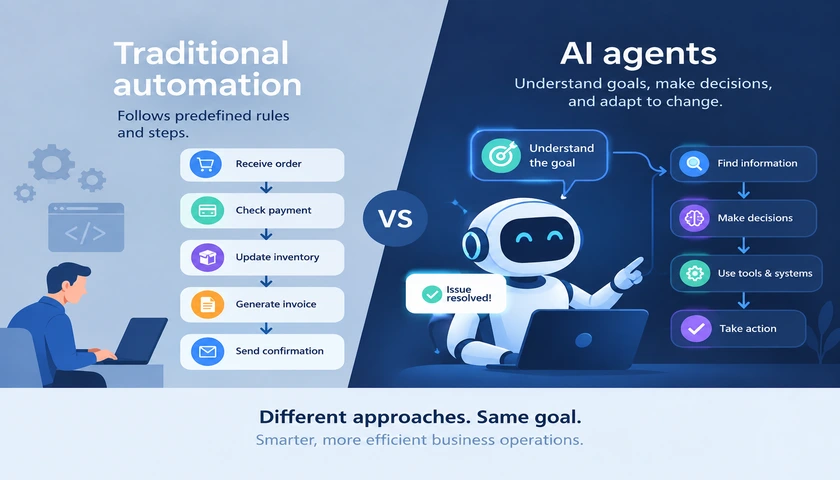
For predictable, rule-based activities, traditional automation may be simpler and more cost-effective.
The best approach is to evaluate business requirements and choose the technology that delivers measurable value.
Frequently asked questions
Can ChatGPT be integrated into an existing website?
Yes. Businesses can integrate ChatGPT-powered assistants into existing websites through backend API connections and custom chat interfaces without rebuilding the entire website.
Can ChatGPT access information from our company database?
Yes, when developers implement secure integrations. Applications can retrieve approved database information and provide relevant context to the AI model while enforcing user permissions.
Do businesses need to train a custom AI model for ChatGPT integration?
Not necessarily. Many business applications can use existing models with customized instructions and retrieval-based access to company information. Additional model customization depends on the use case.
How long does ChatGPT integration take?
Implementation time depends on the application, required features, data sources, and security requirements. A simple assistant may take considerably less time than a complex enterprise integration.
Can ChatGPT integration support multiple languages?
Yes. Supported AI models can understand and generate text in multiple languages, making conversational AI useful for businesses serving customers across different regions.
Is ChatGPT integration suitable for small businesses?
Yes. Small businesses can begin with focused applications such as customer support assistants or internal knowledge tools and expand their AI capabilities as requirements grow.
Conclusion
Integrating ChatGPT into business applications can improve customer interactions, simplify workflows, and make information more accessible.
From customer support and CRM systems to SaaS platforms and internal knowledge assistants, conversational AI offers opportunities to improve how businesses operate.
Successful implementation depends on selecting the right use case, designing secure integrations, connecting reliable data, and continuously evaluating performance.
With a clear implementation strategy, organizations can introduce AI capabilities that support long-term business growth.
Ready to integrate ChatGPT into your business applications?
Transform your existing software with intelligent conversational AI. Build secure, scalable ChatGPT integrations that automate workflows, improve customer experiences, and support business efficiency.