Artificial Intelligence (AI) is rapidly changing how modern applications are built and used. From mobile apps and web platforms to enterprise software and automation tools, businesses are increasingly integrating AI to improve user experiences, automate processes, and make smarter business decisions.

Today’s users expect applications to be faster, more personalized, and capable of understanding their needs in real time. Traditional applications often struggle to meet these expectations without intelligent automation and data-driven capabilities.

This is why AI integration is becoming an essential part of modern application development across industries.

What Does AI Integration Mean in Applications?

AI integration refers to adding intelligent features and machine learning capabilities into applications to automate tasks, analyze data, and improve decision-making.

AI-powered applications can:

  • Understand user behavior
  • Automate repetitive tasks
  • Provide personalized recommendations
  • Predict future trends
  • Improve customer interactions
  • Process large amounts of data quickly

Modern businesses use AI to create smarter, faster, and more scalable digital experiences.

Why Businesses Are Adopting AI in Applications

Businesses are integrating AI into applications to improve operational efficiency, customer engagement, and business performance.

AI helps organizations:

  • Reduce manual work
  • Improve response times
  • Enhance customer experiences
  • Increase productivity
  • Support data-driven decisions
  • Scale digital operations more efficiently

As competition increases across industries, businesses are using AI to deliver more intelligent and personalized services.

1. Personalized User Experiences

One of the biggest advantages of AI integration is personalization.

AI systems analyze user behavior, preferences, search history, and interactions to deliver customized experiences in real time.

Examples include:

  • Product recommendations in eCommerce apps
  • Personalized content feeds
  • AI-powered chat assistants
  • Customized dashboards
  • Smart notifications and suggestions

Personalization helps improve user engagement, customer satisfaction, and retention rates.

2. Predictive Analytics and Smarter Decision-Making

AI-powered applications can analyze large volumes of data and identify patterns that help businesses make better decisions.

Predictive analytics helps organizations:

  • Forecast customer behavior
  • Predict sales trends
  • Detect fraud or anomalies
  • Optimize inventory management
  • Improve operational planning

Instead of relying only on historical reports, businesses can use AI to make proactive and data-driven decisions.

3. Automation of Repetitive Tasks

AI integration helps automate time-consuming and repetitive processes that normally require manual effort.

This may include:

  • Customer support automation
  • Data entry and processing
  • Workflow management
  • Document analysis
  • Scheduling and notifications

Automation improves efficiency, reduces operational costs, and allows teams to focus on higher-value tasks.

4. Improved Customer Support with AI Chatbots

Many businesses now use AI-powered chatbots and virtual assistants to improve customer support experiences.

AI chatbots can:

  • Answer common customer questions
  • Provide instant support
  • Handle multiple conversations simultaneously
  • Offer 24/7 assistance
  • Reduce support workload

Modern AI chatbots also improve over time using machine learning and user interactions.

5. Better Data Processing and Insights

Modern applications generate large amounts of business and customer data every day.

AI systems can process and analyze this data much faster than traditional methods, helping businesses identify:

  • Customer trends
  • Operational bottlenecks
  • Performance insights
  • Marketing opportunities
  • Risk factors

This helps organizations improve efficiency and make faster strategic decisions.

6. Scalability for Growing Businesses

As businesses grow, applications must handle increasing amounts of users, transactions, and data.

AI-powered systems built on scalable cloud architectures can adapt more efficiently to growing business requirements.

AI also helps optimize system performance by automating resource allocation, monitoring usage patterns, and improving operational workflows.

7. Enhanced Security and Fraud Detection

AI is also becoming important for cybersecurity and fraud prevention.

AI systems can monitor activity patterns in real time and identify unusual behavior that may indicate:

  • Fraudulent transactions
  • Unauthorized access
  • Security threats
  • Data breaches

This helps businesses strengthen security and respond to threats more quickly.

8. Competitive Advantage in Digital Transformation

Businesses that integrate AI into applications can often innovate faster and deliver better digital experiences compared to competitors using traditional systems.

AI integration supports:

  • Faster service delivery
  • Intelligent automation
  • Better customer engagement
  • Improved operational efficiency
  • Continuous business innovation

As digital transformation continues to grow, AI is becoming a key factor in maintaining long-term competitiveness.

Building Future-Ready Applications with AI

AI integration is no longer limited to large technology companies. Businesses across industries are now adopting AI-powered features to improve efficiency, customer experiences, and business scalability.

From personalization and automation to predictive analytics and intelligent decision-making, AI helps modern applications become smarter and more adaptable to changing business needs.

With the right development strategy, businesses can build secure, scalable, and future-ready applications that support long-term growth and digital innovation.

FAQs

What is AI integration in applications?
AI integration involves adding artificial intelligence features such as automation, machine learning, chatbots, and predictive analytics into mobile, web, or enterprise applications.

Why are businesses integrating AI into modern applications?
Businesses use AI to improve personalization, automate tasks, analyze data, enhance customer experiences, and increase operational efficiency.

Can AI improve customer engagement in apps?
Yes, AI helps deliver personalized experiences, smart recommendations, and faster customer support, which improves user engagement and satisfaction.

What industries benefit from AI-powered applications?
Industries such as healthcare, finance, retail, education, logistics, and manufacturing commonly use AI-powered applications to improve operations and customer experiences.

Is AI integration suitable for small and medium businesses?
Yes, modern cloud-based AI solutions make AI integration more accessible and scalable for businesses of all sizes.

Artificial Intelligence (AI) is transforming how businesses operate across industries. From automation and predictive analytics to customer support and intelligent decision-making, AI is helping enterprises improve efficiency, reduce operational costs, and deliver better customer experiences.

However, building AI solutions internally is not always easy. Many organizations face challenges such as limited in-house expertise, high development costs, infrastructure requirements, and difficulties in scaling AI projects successfully.

This is why many enterprises choose to outsource AI development to specialized technology partners. The right outsourcing partner can help businesses accelerate AI adoption, reduce implementation risks, and build scalable AI-powered solutions aligned with long-term business goals.

But selecting the right AI outsourcing partner requires careful planning. A wrong decision can lead to delays, budget overruns, security concerns, and failed implementation.

In this blog, we will explore the key factors enterprises should consider when choosing an AI outsourcing partner.

Why Enterprises Are Outsourcing AI Development

AI projects require expertise in multiple areas, including:

  • Machine Learning (ML)
  • Natural Language Processing (NLP)
  • Data Engineering
  • Cloud Infrastructure
  • Automation
  • API Integrations
  • AI Model Training and Deployment

Building and managing all these capabilities internally can be time-consuming and expensive.

Outsourcing allows enterprises to access experienced AI professionals, modern technologies, and scalable development resources without building large in-house teams from scratch.

1. Evaluate Technical Expertise and AI Experience

One of the first things enterprises should consider is the technical expertise of the outsourcing partner.

AI development involves complex technologies, frameworks, and data processing workflows. The partner should have hands-on experience in building real-world AI applications and enterprise-grade solutions.

Look for expertise in areas such as:

  • Machine Learning and Deep Learning
  • Generative AI solutions
  • Chatbots and virtual assistants
  • Predictive analytics
  • Computer vision
  • Cloud AI platforms
  • Data management and analytics

Reviewing previous projects, case studies, and technology stacks can help evaluate their experience level.

2. Check Industry Understanding

AI solutions should align with business operations and industry-specific requirements.

An outsourcing partner with experience in your industry will better understand compliance requirements, workflows, operational challenges, and customer expectations.

For example:

  • Healthcare businesses may require HIPAA-compliant AI solutions
  • Financial organizations may focus on fraud detection and data security
  • Retail businesses may need recommendation engines and customer analytics

Industry knowledge helps improve implementation quality and reduces project risks.

3. Focus on Scalability and Long-Term Support

Many AI projects start small but expand over time.

Enterprises should choose outsourcing partners capable of building scalable AI architectures that support future growth, larger datasets, and increasing user demands.

Long-term support is equally important. AI systems require:

  • Continuous monitoring
  • Model optimization
  • Performance improvements
  • Security updates
  • Retraining and maintenance

A reliable outsourcing partner should provide ongoing support even after deployment.

4. Evaluate Data Security and Compliance Practices

AI systems process large amounts of business and customer data, making security a critical factor.

Before selecting an outsourcing partner, enterprises should evaluate their:

  • Data protection policies
  • Access control practices
  • Compliance standards
  • Cloud security measures
  • Backup and disaster recovery processes

The partner should follow strong cybersecurity practices and ensure compliance with industry regulations and data privacy requirements.

5. Review Communication and Project Management Approach

Poor communication is one of the most common reasons outsourcing projects fail.

A good AI outsourcing partner should maintain transparent communication throughout the project lifecycle. This includes:

  • Regular progress updates
  • Clear timelines and milestones
  • Agile development processes
  • Dedicated project management
  • Collaboration tools and reporting

Strong communication helps reduce misunderstandings and keeps projects aligned with business goals.

6. Understand Their AI Development Process

Enterprises should also understand how the outsourcing partner approaches AI development.

A structured development process usually includes:

  • Requirement analysis
  • Data collection and preparation
  • Model development and training
  • Testing and validation
  • Deployment and integration
  • Monitoring and optimization

A well-defined process improves project efficiency and reduces implementation risks.

7. Consider Cost vs Value

Choosing the lowest-cost outsourcing provider may lead to poor implementation quality and higher long-term expenses.

Instead of focusing only on pricing, enterprises should evaluate the overall value offered by the partner, including:

  • Technical expertise
  • Scalability
  • Security standards
  • Delivery timelines
  • Post-launch support
  • Business understanding

A reliable AI outsourcing partner helps businesses achieve better long-term ROI through efficient and scalable solutions.

8. Look for Flexibility and Custom AI Solutions

Every business has different operational goals and technical requirements.

The outsourcing partner should be able to provide customized AI solutions instead of relying only on generic prebuilt models.

Flexible development approaches allow businesses to:

  • Integrate AI into existing systems
  • Scale features gradually
  • Customize workflows
  • Improve customer experiences
  • Support future innovation initiatives

This helps enterprises maximize the value of AI investments.

Building Successful Enterprise AI Solutions

AI outsourcing can help enterprises accelerate digital transformation, improve operational efficiency, and build innovative customer experiences without the challenges of managing large internal AI teams.

However, successful AI implementation depends heavily on selecting the right outsourcing partner. Businesses should focus on technical expertise, scalability, security, communication, and long-term support when evaluating AI service providers.

With the right approach and technology partner, enterprises can build scalable, secure, and future-ready AI solutions that support long-term business growth.

FAQs

Why do enterprises outsource AI development?
Enterprises outsource AI development to access specialized expertise, reduce development costs, accelerate implementation, and build scalable AI solutions without creating large in-house AI teams.

What should businesses look for in an AI outsourcing partner?
Businesses should evaluate technical expertise, industry experience, scalability, security practices, communication processes, and long-term support capabilities.

Is AI outsourcing cost-effective for enterprises?
Yes, outsourcing AI development can reduce hiring, infrastructure, and operational costs while providing access to experienced AI professionals and advanced technologies.

How important is data security in AI outsourcing?
Data security is extremely important because AI systems often process sensitive business and customer information. Enterprises should choose partners with strong security and compliance practices.

Can outsourced AI solutions scale with business growth?
Yes, experienced AI outsourcing partners build scalable AI architectures that can support future business growth, larger datasets, and increasing operational requirements.

Building a custom, ChatGPT-like application for your business in 2026 is no longer about proving the tech works—it’s about moving from a “generic wrapper” to a proprietary asset. Off-the-shelf bots often fail because they lack your brand’s specific context, domain logic, and infrastructure guardrails.

To build a version that truly scales, you need to treat AI as infrastructure, not just a feature.


1. The “Small Model” Advantage (SLMs)

In 2026, the trend has shifted away from using the largest model possible for every task. For business-specific apps, Small Language Models (SLMs) are often superior. They are faster, cheaper to run, and can be hosted on your own private cloud to ensure data sovereignty.

  • Why it matters: Unlike general LLMs that behave probabilistically, an SLM fine-tuned on your company’s SOPs and data provides deterministic performance—meaning it follows your business rules every single time without “hallucinating” brand-new policies.

2. Dynamic UI and “A2UI” Protocols

A ChatGPT-like app shouldn’t just be a wall of text. Modern business AI uses Declarative UI (A2UI). Instead of the AI just talking, it should be able to “request” UI components from your design system.

The Workflow:

  1. User asks: “Show me our Q1 sales performance.”
  2. The AI doesn’t just type numbers; it sends a JSON payload to your frontend.
  3. Your app renders a pre-approved, production-ready Chart Component from your design system.
  • The Result: You maintain 1:1 visual parity with your brand while giving the AI “hands” to manipulate your data visually.

3. Bridge the Design-to-Code Gap

If you are building this in-house, your biggest bottleneck will be the handoff between AI logic and your UI. By using design tokens (e.g., color-brand-primary instead of #0055FF), you allow your AI to understand your design system’s vocabulary.

Elite Tier Strategy: Use a Figma-to-Code workflow where your AI “reads” your layer tree. This ensures that when the AI generates a new interface or response, it uses your actual code primitives, not a generic approximation.

4. The “RAG” vs. “Long Context” Decision

How does your AI know your business? You have two main paths:

  • Retrieval-Augmented Generation (RAG): The AI searches your database (vector DB) for relevant snippets before answering. Best for massive datasets (e.g., thousands of legal documents).
  • Long-Context Window: In 2026, models can ingest hundreds of pages at once. For smaller businesses, you can simply feed your entire project codebase or handbook into the prompt context for near-perfect accuracy without the complexity of a vector database.

Tech Stack Comparison for 2026

ComponentThe “Buy” ApproachThe “Build” Approach (Elite)
ModelOpenAI / Anthropic APIFine-tuned SLM (Mistral/Llama)
DataCopy-paste into “GPTs”Private RAG Pipeline / Vector DB
UIBasic Chat InterfaceA2UI (Component-native rendering)
SecurityThird-party cloudPrivate VPC / On-prem
UpdatesManual prompt tweaksAutomated Guardrail testing

Key Takeaway: Don’t Build a Chatbot, Build a Workflow

The most successful business AI apps in 2026 don’t just “chat”—they perform tasks. Whether it’s an internal tool that generates production-ready code or a customer-facing portal that builds personalized dashboards on the fly, the value lies in the integration.

In the rush to be “AI-first,” many enterprises are over-engineering simple problems. They are using a multi-billion parameter Large Language Model (LLM) to perform tasks that a 10-line Python script or a basic IF/THEN statement could handle faster, cheaper, and with 100% accuracy.

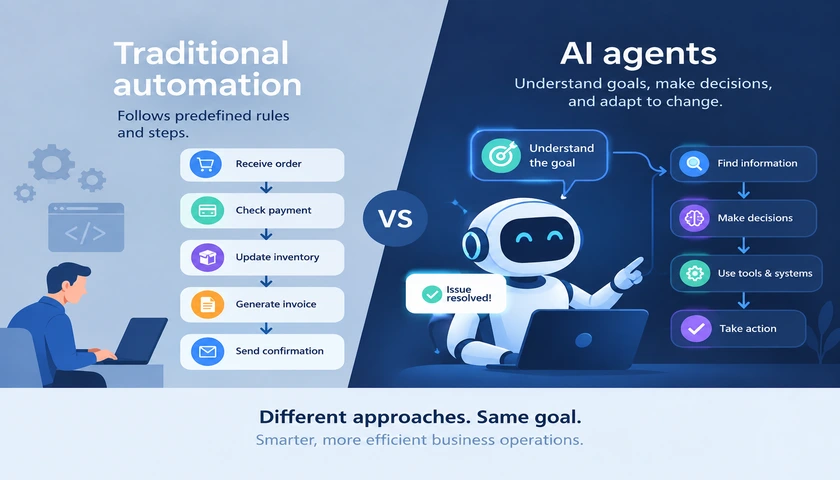
At Techmakers, we view AI and Traditional Automation (Deterministic Logic) as two different instruments in the same orchestra. Choosing the wrong one doesn’t just waste budget—it introduces unnecessary “hallucination risk” into your core business processes.

Here is the strategic framework for deciding when to use Probabilistic AI versus Deterministic Automation.


1. Traditional Automation: The “Zero-Error” Zone

Traditional automation is deterministic. If you give it Input A, it will always produce Output B. It follows a strict, pre-defined path of logic.

Choose Traditional Automation when:

  • The Rules are Fixed: Processing a payroll, calculating tax, or syncing inventory levels between a warehouse and an e-commerce store.
  • Accuracy is Non-Negotiable: In financial transactions or medical records, “95% accuracy” is a failure. You need 100%.
  • High Frequency, Low Complexity: Moving data from a form to a database. It’s boring, repetitive, and doesn’t require “thought.”

The Technical Move: Use APIs, Cron Jobs, or RPA (Robotic Process Automation). This is the “backbone” of your digital transformation.

2. AI & Machine Learning: The “Unstructured” Zone

AI is probabilistic. It doesn’t follow a fixed map; it predicts the most likely outcome based on patterns. It thrives where rules are fuzzy or non-existent.

Choose AI when:

  • The Input is Unstructured: Analyzing a 50-page PDF contract, summarizing a recorded Zoom call, or identifying a “happy” customer vs. an “angry” one in support tickets.
  • The Output Requires Creativity: Generating personalized marketing copy, suggesting code snippets, or creating synthetic data for testing.
  • Patterns are Hidden: Predicting which users are likely to churn next month based on subtle changes in their behavior.

The Technical Move: Use LLMs (like Gemini or GPT-4), Computer Vision, or Vector Search.


3. The Hybrid Model: The “Techmakers” Standard

The most powerful enterprise apps don’t choose one; they use Traditional Automation as the guardrails for AI.

Example: Automated Invoice Processing

  1. AI Layer: “Reads” a messy, scanned PDF invoice and extracts the “Total Due” and “Vendor Name” (Unstructured data).
  2. Traditional Layer: Checks the “Vendor Name” against your verified SQL database and ensures the “Total Due” doesn’t exceed a pre-set $500 limit (Deterministic rules).
  3. Outcome: High speed with zero “hallucinated” payments.

Decision Matrix: AI vs. Deterministic Logic

FeatureTraditional AutomationAI Implementation
Logic TypeIf/Then (Rules-Based)Probabilistic (Pattern-Based)
Data TypeStructured (Tables/CSV)Unstructured (Text/Images/Audio)
Cost per TaskNegligible (CPU cycles)Moderate (GPU/Token costs)
Failure ModeStops/Errors out (Safe)Hallucinates (Risky)
ScalabilityHigh (Linear)High (Exponential with RAG)

Summary: Don’t Kill a Fly with a Sledgehammer

AI is a transformative power, but it is an expensive and “fuzzy” way to solve simple logic problems. Before you add an “AI” label to a feature, ask: “Can I write a rule for this?”

If the answer is Yes, automate it traditionally.

If the answer is “It depends on the context,” call in the AI.

At Techmakers, we help you architect a Modular Stack where AI handles the complexity and traditional code handles the consistency. That is how you build an “Elite” score infrastructure.

The question for enterprise leaders in 2026 is no longer if they should adopt AI, but how they can do so without creating a fragmented, unmanaged, and expensive landscape of “AI silos.”

Most organizations start with a “Chatbot-first” mentality. While low-hanging fruit is tempting, true digital transformation happens when AI is woven into the structural fabric of the company. At Techmakers, we’ve identified that successful AI adoption isn’t a software upgrade—it is an architectural and cultural shift.

Here is the four-pillar strategy for moving from AI experimentation to enterprise-grade execution.


1. The Data Liquidity Audit: Fueling the Engine

AI is only as intelligent as the data it can access. Most enterprises struggle because their data is “frozen” in legacy monoliths or disconnected spreadsheets. To succeed, you must move from Data Hoarding to Data Liquidity.

The Technical Move: Implement a Vector Database (like Pinecone or Milvus) alongside your relational data. This allows your AI to perform “semantic search”—understanding the intent behind a query rather than just matching keywords.

2. RAG over Fine-Tuning: Context is King

A common mistake is attempting to “train” a custom LLM on company data. This is expensive, slow to update, and prone to hallucinations.

The Technical Move: Use Retrieval-Augmented Generation (RAG). Instead of teaching the model your data, you give the model a “library card.” When a user asks a question, the system retrieves the most relevant, up-to-date documents from your private cloud and asks the AI to summarize only that information.

  • Benefit: Higher accuracy, lower costs, and immediate data updates without retraining.

3. The “AI Guardrails” Framework: Security & Compliance

In a regulated enterprise environment, “unfiltered” AI is a liability. You need a middle layer—an AI Gateway—that sits between your users and the Large Language Models.

The Strategy:

  • PII Redaction: Automatically scrubbing personally identifiable information before it hits a public API.
  • Cost Management: Implementing “Token Quotas” to prevent a single department from blowing the monthly API budget on experimental prompts.
  • Hallucination Checks: Using secondary “validator” models to cross-reference AI outputs against your ground-truth data.

4. Concurrent Engineering: Building the Interface

AI is useless if the user interface is clunky. Successful adoption requires Designers who Code. The UI for an AI-powered app isn’t a static dashboard; it’s a conversational, generative, and adaptive experience.

The Techmakers Edge: We use Design Tokens to ensure that as your AI features evolve, the UI scales with them. By syncing design and engineering in real-time, we can roll out “AI-First” features in weeks, ensuring your team actually uses the tools you build.


The Maturity Curve: Where Does Your Enterprise Stand?

StageCharacteristicsThe Next Step
ExperimentalUsing public ChatGPT for basic tasks.Conduct a Data Security Audit.
OperationalInternal RAG-based tools for HR/Wiki.Integrate AI into core product workflows.
OptimizedAI-driven decision making and automation.Scale via Modular Microservices.

Conclusion: The Partner Advantage

Adopting AI is a high-stakes move. If you build on a fractured foundation, you are simply automating your existing inefficiencies.

At Techmakers, we help enterprises bypass the “Hype Phase” and move directly into Value Creation. We don’t just give you an AI tool; we give you a scalable, secure, and data-liquid ecosystem that becomes a permanent competitive advantage.